



At a glance
Expert’s Rating
Pros
- Excellent malware detection
- Fast scanning performance
- Useful built-in VPN
- Helpful security guidance
- Clean, focused interface
Cons
- Leaves some support files behind
- No phishing website blocking
- No scan time estimates
- Trial requires payment information
Our Verdict
MacPaw’s Moonlock succeeds by focusing on the security features that matter most instead of trying to become another bloated system cleaner. Its malware detection is fast and impressively thorough, the bundled VPN performs well for everyday travel use, and the educational Security Advisor encourages better online habits rather than overwhelming users with technical jargon. Malware cleanup occasionally leaves behind non-executable support files, and requiring payment information before the seven-day trial is disappointing, but overall Moonlock delivers an excellent balance of protection, usability, and value for home users and small offices.
Price When Reviewed
This value will show the geolocated pricing text for product undefined
Best Pricing Today
Best Prices Today: MacPaw Moonlock
Who it’s best for: Home users and small businesses wanting a focused, lightweight Mac security suite with excellent malware protection and a capable VPN.
Who it’s not for: Enterprise administrators or advanced users who require detailed logging, centralized management, or extensive network security controls.
At a glance
Protection: ★★★★★
Performance: ★★★★★
Features: ★★★★☆
Ease of use: ★★★★★
Value: ★★★★☆
Moonlock is MacPaw’s dedicated Mac security application, combining malware protection, VPN services, scam detection, and security education into a streamlined package. Rather than trying to replace every maintenance utility on your Mac, it concentrates on protecting your system against modern threats while encouraging safer computing habits.
For this review I tested Moonlock extensively under macOS Tahoe using more than 160 live malware samples from the Objective-See malware archive, evaluating its malware detection, VPN, scam detection, network protection, and overall performance. The results were consistently impressive, with only a handful of minor shortcomings.
Features: What do you get with MacPaw Moonlock?
Moonlock includes malware scanning, real-time protection, a VPN, Network Inspector, Scam Detector, System Protection, and Security Advisor. The suite focuses on practical security tools rather than unnecessary extras.
While it lacks parental controls, password management, and identity monitoring found in some competing suites, every included feature feels purposeful and well implemented.
Malware Protection
Customizing Moonlock’s Malware Scanner utility.
Foundry
Moonlock’s Malware Scanner is unquestionably the centerpiece of the suite. During initial testing it detected 266 malware components, integrating seamlessly with macOS XProtect and Gatekeeper under macOS Tahoe.
Real-time protection proved particularly effective. Compressed malware archives were detected successfully, including fake installers for popular applications such as Discord and WhatsApp. External USB drives are automatically scanned after mounting, and users can manually scan any folder or drive using the “Scan an Item…” feature.
Cleanup was excellent overall, although several malware families – including CrateDepression, DigitStealer, FlexibleFerret, Inqtana, and KandyKorn – left behind harmless support files after executable components had been removed.
Firewall & Network Protection
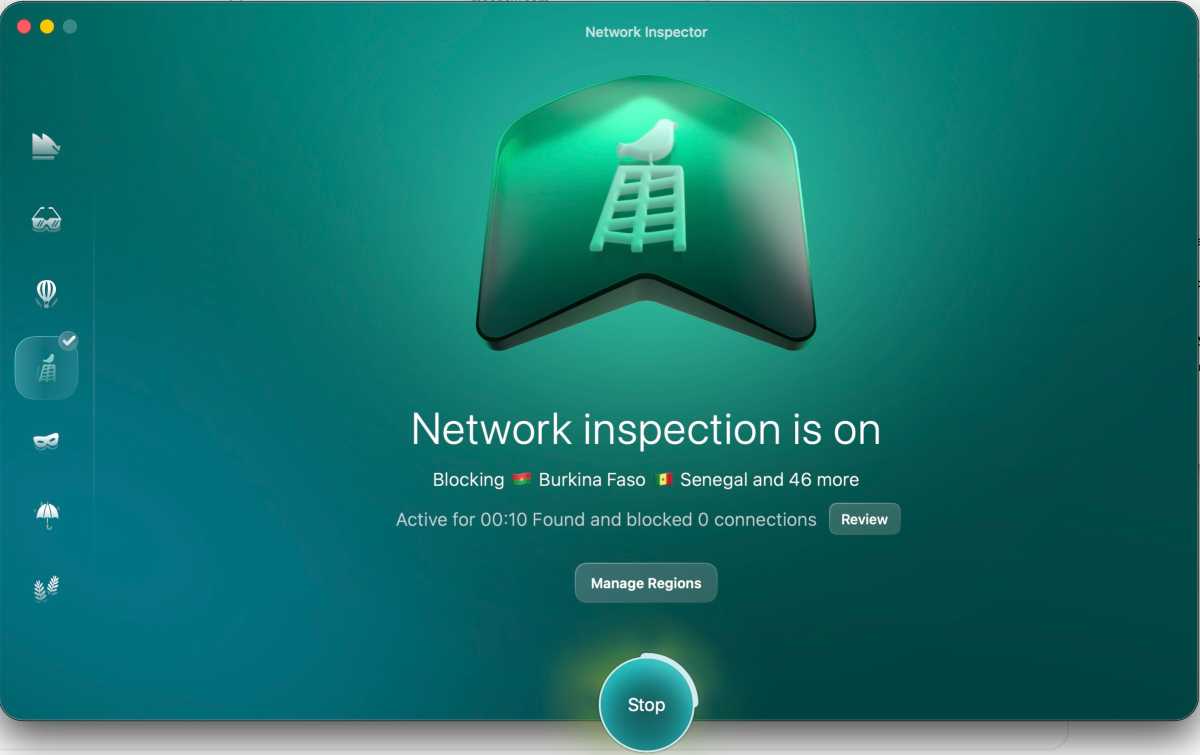
A Network Inspector tool can be used to block incoming traffic from specific countries.
Foundry
Rather than functioning as a traditional firewall, Moonlock’s Network Inspector lets users block traffic to and from selected countries. Regions can be filtered using predefined categories including Scam Risks, Sanctioned Countries, and Bot Traffic, making configuration straightforward while offering useful protection for many users.
Web & Phishing Protection
Moonlock’s Scam Detector uses AI to analyze images and up to 20,000 characters of text for phishing attempts and online scams. It produces reliable assessments with relatively few false positives.
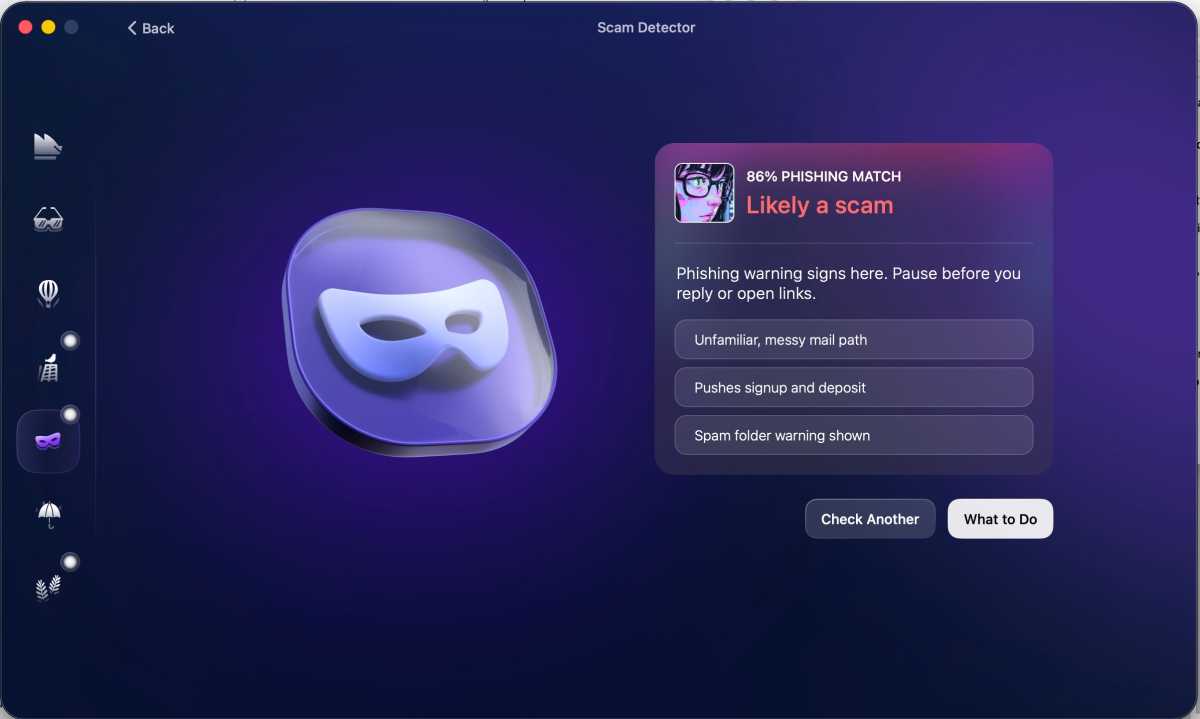
The Scam Detector tool analyzes phishing text from an email.
Foundry
However, the suite does not actively block malicious websites or phishing URLs while browsing, leaving Safari and other browsers dependent upon their own built-in protections.
Extras (and What’s Missing)
The bundled VPN is surprisingly capable. While it lacks advanced administrative features such as activity logs or detailed configuration options, it delivers excellent performance, easy server switching, and includes a Kill Switch.
System Protection and Security Advisor also stand out by educating users rather than simply generating warnings. Helpful guidance, direct links into macOS Settings, and MacPaw’s entertaining “Cybersecuritoons” videos encourage better long-term security habits.
Test Results: How well does Moonlock protect your Mac?
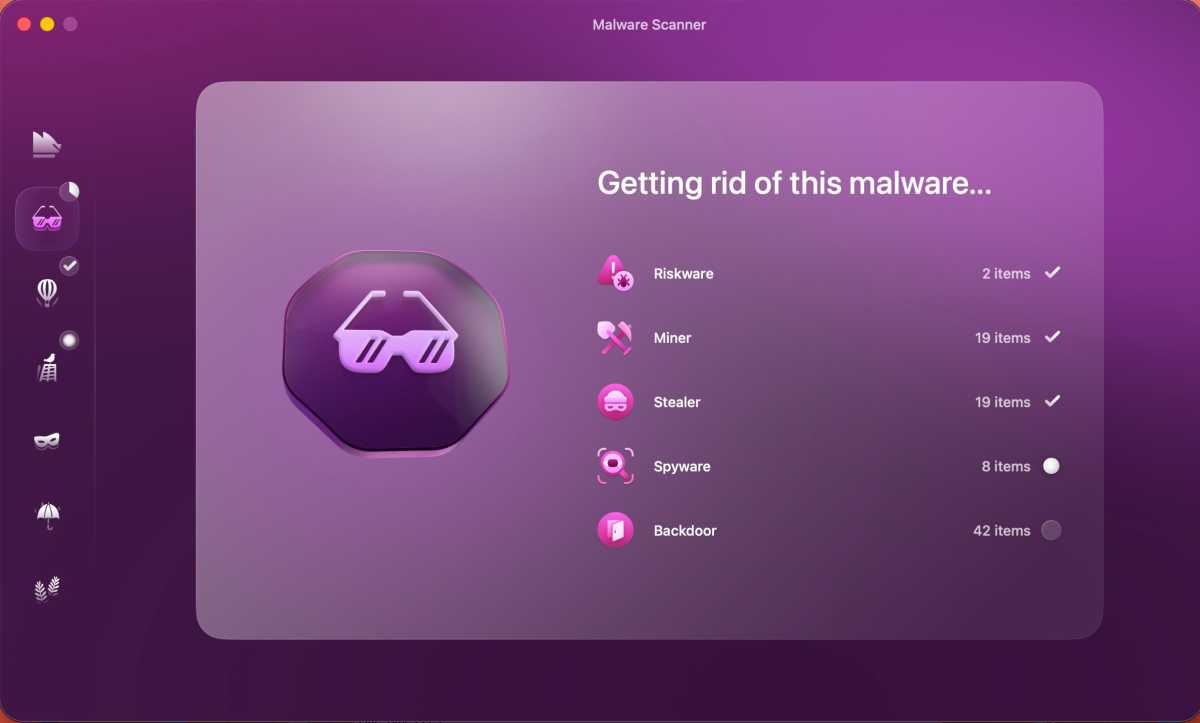
Moonlock’s malware scanner removes dozens of quarantined items
.
Foundry
Moonlock successfully detected nearly every malware sample tested, including compressed archives and disguised application installers. Real-time protection reacted quickly and consistently throughout testing.
Real-World Testing
Testing consisted of more than 160 active and archived malware samples from the Objective-See security archive.
The scanner quarantined executable malware almost immediately while working smoothly alongside macOS’s own XProtect and Gatekeeper protections. Only a handful of non-executable support files remained after cleanup, leaving no functional malware behind.
External storage devices were scanned automatically upon connection, while manual scans of selected folders worked exactly as expected.
Reliability
Moonlock maintained an excellent balance between protection and usability. False positives were minimal, and security alerts were clear without becoming intrusive or overly aggressive.
Independent Lab Results
At the time of testing, recent independent AV-Test and AV-Comparatives Mac-specific benchmark results for Moonlock were not available. As a result, this review is based primarily on extensive hands-on testing using live malware samples under macOS Tahoe.
Methodology
Testing was performed on macOS Tahoe 26.6 using Moonlock’s complete feature set. More than 160 active and compressed malware samples from the Objective-See malware archive were evaluated alongside phishing detection, VPN performance, network controls, and everyday usability. Performance observations were made throughout normal multitasking to determine whether scanning noticeably impacted system responsiveness.
Performance: Will Moonlock slow down your Mac?
Moonlock proved exceptionally lightweight throughout testing. Full system scans completed quickly without noticeably affecting day-to-day work.
Animations remain smooth, interface responsiveness stays high, and background scanning rarely interferes with normal productivity.
Real-World Behaviour
Even while scanning hundreds of malware samples, my MacBook Pro remained responsive enough for everyday multitasking. The interface is polished, malware quarantine events are accompanied by satisfying sound effects, and the application’s visual design never comes at the expense of performance.
Key Metrics
While Moonlock currently doesn’t display scan duration or estimated completion times, overall scan speed was among the fastest observed during testing.
Ease of Use: Is Moonlock Mac-friendly?
Moonlock installs cleanly, requiring only Full Disk Access and Network Extension permissions before becoming fully operational.
Its interface feels modern and Mac-native, organizing features into clearly labelled modules without overwhelming users. Security Advisor and System Protection deserve particular praise for translating security recommendations into actionable steps, often linking directly to the appropriate macOS Settings pages instead of forcing users to hunt through menus.
Moonlock pricing and plans
Moonlock is competitively priced for individual Mac users and small offices. Subscription plans offer the best long-term value, while perpetual licenses remain available for those who prefer one-time purchases.
| Macs | One-Time Purchase | Annual Subscription | Monthly |
|---|---|---|---|
| 1 Mac | $150 | $54/year ($4.50/month) | $13.50/month |
| 2 Macs | $240 | $84/year ($7/month) | |
| 5 Macs | $480 | $168/year ($14/month) |
Moonlock offers strong value thanks to its excellent malware protection, capable VPN, and thoughtful security education features. While it lacks some enterprise capabilities and advanced extras found in larger security suites, its focused approach makes it an appealing alternative for users who simply want dependable Mac protection without unnecessary complexity.
Should you buy MacPaw Moonlock?
Yes. Moonlock is one of MacPaw’s strongest products to date because it understands exactly what it wants to be: a focused Mac security suite rather than another all-purpose maintenance utility. Malware protection is excellent, the VPN performs surprisingly well, and the educational tools genuinely help users improve their security habits. Requiring payment details before beginning the free trial is unfortunate, and enterprise users may want more advanced management tools, but for home users and small offices Moonlock is an easy recommendation and one of the better Mac security products currently available.

